Showing posts with label Technology. Show all posts

16 May 2026

Image insertion now on reMarkable

A photo of a handwritten page on a reMarkable 2 showing an image inserted and then annotated.

ReMarkable continue to update their digital paper tablets, with new features arriving every month or so. The latest update adds the ability to take an image and insert it into a notebook on the device. Once it's in, you can scale, rotate and copy the image as you wish, and annotate it to your heart's delight.

You can only add an image from the desktop app at the moment, but hopefully they'll find a way to make the web app and iOS / Android companion apps capable of doing it soon.

Edit: You can do this on iOS/iPadOS by copying and pasting from Photos into a notebook in the reMarkable companion app.

I tried it with some of my notes for the Blue Planet Recontact scenario I ran at North Star, and it worked without a fuss.

As far as I can see, this works with all their devices, even the rM1. However, you do need to have a Connect subscription to use it.

Lovely how this just keeps getting better.

16 May 2026

11 January 2026

That sound... mechanical keyboard delight

A photo of a Keychron K10 Max keyboard on a desk. The keyboard frame is black, and most of the keys are a dark grey blue. The ESC key is orange, and the function and modifier keys a lighter grey.

I previously did a short review on the Keychron K10 Max, which is the keyboard that I use when I'm not working in my home office*, but it continues to give me delight to use.

That delight comes from the sound of the keyboard as much as the feel, so I thought I'd share an audio file of the noise. There's something about it that just makes me want to type...

(*) When working, I use my Logi MX Keys S, as it's a lot quieter, which helps in Teams meetings when I'm doing two things at once!

11 January 2026


21 December 2025

Facebook, meh.

Message that greats you when you open the Facebook Messenger app in macOS now. "Messenger desktop app is no longer available. You can continue your conversations on the web or mobile. For your security, we recommend deleting this app.", which is followed by two buttons - go to web or learn more.

I don't like Facebook.

I use it because some of the active communities for gaming spaces are there, and also there are family and friends that I find easiest to reach there. The kind of folks who suggesting something like Mastodon or MeWe would get a blank look from.

Messenger has been a key way of communicating with those folks (although I use SMS/RCS/iMessage and WhatsApp much more commonly with the folks I talk to more).

Meta have just killed the desktop version of the Messenger App, meaning you need to go into Facebook to message folks or use the mobile app. Kind of frustrating.

Dialogue box with a message "You can try again in 11 minutes, 20 seconds. You have 4 more tries to enter your PIN before it won't work any more. If you've forgotten your PIN, you can reset it. Learn how.", followed by a button "Skip restoring".

I managed to typo my PIN for encrypted messages when I went to the web interface, so it gives you a 15 min wait before you can try to restore chat history again. And a scary '4 more tries message'.

While I'm waiting, here's a book recommendation:

Cover of a book with red background and an image of a pair of legs rising out of a blue rounded square like it's a pool. The top reads: "The Sunday Times Bestseller". The Title is: "Careless People - A story of where I used to work. Power. Greed. Madness." The Author is Sarah Wynn-Williams. There are two more promo quotes: "Jaw dropping - Financial Times" and "Devastating... highly enjoyable - The Times".

Sarah Wynn-Williams' autobiography on her time with Facebook is quite revealing and Meta has tried to cancel her as a result. She's not allowed to promote the book due to an injunction. Publisher info on the book here. The first third of the book, I was shocked with her naivety, the rest I was feeling for her and increasingly shocked.

It doesn't make me like Facebook any better.

21 December 2025

15 November 2025

Solving Interference with Audio Hijack: fixed, RFTM!

Screenshot of the Audio Hijack window showing the following block arrangement: Application (Discord) >> Peak/RMS (two channels) then a split into two parallel feeds. The first is Channels (Mono) >> Recorder (showing MP3 and 256 kbps Stereo, and faded-out pause and split buttons below). The second leg has Channels (Copy Right) >> Output Device (Ink’d+ Active with a warning icon as it is not connected at the time of the screen shot).

So after posting here, and sharing on Mastodon and Facebook, I drew a blank except for a helpful post from Rogue Amoeba (Audio Hijack's publisher) which I managed to miss for nearly a week because dice.camp by default doesn't show mastodon.social posts unless you are following someone (there are reasons for this, but that will get away from the tech discussion).

Ultimately, I was doing it wrong (yes, I know that, that's why I asked the question). The solution was in the support documents but I wasn't thinking in the right way. This was effectively recording a VOIP voice chat, and I'd not thought that through or read around the issue enough.

First error; using the Jabra conference speaker left me open to feedback and interference, so I switched to a headset.

The main fix was to change the set-up of the blocks to match those recommended for Voice Chat capture. The main feed from Discord when into a two channel Peak/RMS block and I had the microphone feed from my headset to the left channel, and the Discord output to the right channel. 

The output from that block split into two parallel operations. The first took both channels into a mono-feed and then recorded it. The second operation filtered out the left channel - my headset microphone feed - and only fed the right channel (Discord output without my audio) into my headset. 

End result was perfect audio, just in time for the final episode of the game.

Very much a case of RTFM. 

Thank you to Rogue Amoeba for their gracious response when I saw their post and confessed that that I'd not read the support docs adequately!

15 November 2025

05 November 2025

Solving interference when using Audio Hijack: How do I fix this?

A simple three block diagram from Audio Hijack - the first block ("Application, Discord") connects in parallel to ("Recorder, MP3 Stereo, 256kbs", with 'pause' and 'split' buttons) and also to ("Output Device, Jabra SPEAK 510 USB").

If you've been following my posts on the Jägermeister Adventure, you'll know that I've been recording the audio from the game sessions to process and capture the transcript. 

I'm using a MacBook Pro M1, with a Jabra Speak 510 USB conference speaker attached to it. I capture audio with Audio Hijack (by Rogue Amoeba).

I'm seeing an issue when recorded where the players are getting interference from my channel when we're recording. The diagram above shows how I have Audio Hijack's blocks set up. I think that the issue may be that Discord is repeating my audio input a fraction of a second after I talk and it's interfering with for the other players. However, I'm not sure how to solve it.

A simple three block diagram from Audio Hijack - the first block ("Application, Discord") connects in series to ("Recorder, MP3 Stereo, 256kbs", with 'pause' and 'split' buttons) and then to ("Output Device, Jabra SPEAK 510 USB").

I tried a serial connection instead, but the issue remains.

A simple three block diagram from Audio Hijack - the first block ("Application, Discord") connects in series to ("Recorder, MP3 Stereo, 256kbs", with 'pause' and 'split' buttons) and then to ("Output Device, Jabra SPEAK 510 USB") which is greyed out as it is disabled.

I then tried switching off the output block, which removed the interference  but that meant I couldn't hear the other players (but they could hear me).

Using Chrome (with Roll20's own AV) as the audio source also makes no difference.

I'm wondering if the answer may be a headset? Anyone got any ideas?

Thanks!

5 November 2025

Edit: 15th November - solution is here.


01 November 2025

WH40K Virtual Experience


On Friday, my friend Remi had his 50th birthday party over in Manchester. My fellow Garricon organiser, Graham, was also there. I had a pretty torrid drive over (it took me 40 minutes to go 5 miles due to someone breaking down in the roadworks on A1(M). 

We had a rendezvous at a carvery at the edge of the Trafford Centre, then headed over to Meetspace VR where were played two VR games. The first game was set in the Warhammer 40,000 universe, where we are playing space marines from the Ultramarine chapter.

We split into two squads of four marines, with the mission sometimes having us work together and other times having separate objectives. I was pleased to come second overall and first in our squad.

Screenshot of the table of results, showing 8 player IDs, enemy kills, elite skills, headshots, deaths, hive tyrant damage, revive count, venue rank, and total score.

The VR was very immersive; you completely lost any sense of the outside world. There were two odd things. In the game, you change levels by walking down or up a ramp, and the difference between what you're seeing and feeling gives a slightly disorientating feeling. The second weird element was the safety features! If you get too close to another player, they highlight with a red cylinder and alarms drown out the audio feed. Walls have a similar effect. Necessary, but strange. It was a bit frustrating at one point as I effectively got boxed by a wall by the other players. 

However, it was an incredible experience. I'd happy do it again, although I hope there are other scenario options. The thirty minutes felt both much longer and shorter than it was. It was very intense! 

The second game was a four-player one with a less sophisticated set up. We were trapped in a bandstand in an amusement park fighting off zombies. It was fun but not a patch on the space machine experience.

Overall, a fantastic evening out! Happy Birthday, Remi!

1 November 2025

26 October 2025

Impressions after a month with the reMarkable Paper Pro Move

Photo of a reMarkable Paper Pro Move lying open on the table, showing the handwritten version of the first paragraph of this blog. The title is highlighted in yellow and the text is in black.

When reMarkable released their third generation Paper Pro notebook last year, my initial reaction was that it was a lovely device but I had absolutely no reason to upgrade from my reMarkable 2. The colour screen was nice, but there was no compelling reason to upgrade, especially at the price point. One of my close colleagues at work got themselves one, and that just confirmed my decision. Lovely but no need to change- the rM2 was enough for me.

When reMarkable followed up the Paper Pro a year later with a new smaller device with the same colour screen technology, it caught my attention again. My existing device meets most of my needs really well, but it's never felt properly portable. It is thin, light, and - like all e-Ink screens - vulnerable to cracking if you don't look after it. It's beautiful, well made and very light and thin, but it doesn't feel robust. Bizarrely, my son's rM1 first generation device which is made of plastic always feels less susceptible to damage than its successor does. I've always treated my rM2 like it's a fragile device which cost nearly five hundred pounds, having it in a Book Folio, and then a laptop/tablet sleeve when I travel. That's not let me down in nearly five years of use. 

 Photo of the rM2 (left) vs rM Paper Pro Move (right), both showing the same menu level in the folders.

The rM2 always felt a bit too big to be truly portable. In fact, all of the previous devices are like large notebooks which you keep on a desk, or put in your bag, rather than putting it in a pocket. The new Paper Pro Move addresses some of those gaps. It is smaller (more like a reporter's note book than a Moleskine), feels more robust, and has the bonus of a colour screen.

In honesty, just being smaller and more robust would have peaked my interest and the colour is just a bonus.

I ordered one, and it took about 10 days to arrive.

Photo of a reMarkable Paper Pro Move with the basalt colour Book Folio and a pen on the right, clipped magnetically to it. The word "ReMarkable" is written in a dark colour on the top left.

Physically, it feels robust and very well made. There is nothing cheap or badly made about it. I got the "basalt" colour book folio (which is a recycled polyester colour weave that seems to be reasonably dirt resistant). The small form factor and thickness make it feel like something that you can put in a pocket.

The pen is the new active type, the same as the one used on the Paper Pro. It secures to the side of the device magnetically and charges by induction. Because of the different screen technology used on the colour devices, while the black ink setting is really responsive, the colour ink setting has a flicker as it is drawn and the screen refreshes around it. The initial line is always there just as fast as with the black, but it redraws as you move on, setting the colour. This is a bit quirky, but not really an issue for me as I mostly write in black. There are some good reviews on the technology online, especially on the My Deep Guide YouTube channel if you want to get a feel for it visually.

The feel of the pen remains good and there is a variance in the feel when you change pen types, but it does feel a bit more "clicky" when you are writing and lift the pen from the screen than the rM2. However, that soon became unnoticeable, especially as I adjusted how I wrote on the screen to minimise it naturally.

Battery life seems fine, but I'm using the same disciplines I do as on my reMarkable 2 (i.e. WiFi mostly off, and minimal use of the backlight). Speaking of which, the backlight is nice for exactly the same reason as I like it on my Kindle Paperwhite - you can put it on low and easily use the device without disturbing others, something that works just fine for a quick note if you remember or think of something in bed.

The colours on screen are what I expected - muted but distinctive. They do add something, but I'd have happily had this device with rM2 level screen technology.

Over the last month, I've been using the rM Move as a companion device. It doesn't replace the rM2, it supplements it. My original device has become like a desk notebook, larger and used for meetings and more extensive notes. The rM Move comes with me pretty much everywhere. Its form factor feels less formal, and I find myself using it to take notes when I'm reading books. I used it extensively across two gaming conventions for notes during sessions (although I did most of my prep for games I ran on the rM2).

One interesting change is that I use the unlimited paper scroll option on the rM Move but still detest it on my larger device, preferring to stick with full pages. Somehow, this reminds me of a spiral bound reporter-style note book when I use it and scroll up and down.

Access to larger pages is fine - you can turn the rM Move to switch to landscape mode if you're struggling to add details. I've not had any problems with file synchronisation but I don't tend to open the same notebook file on both devices at once.

Having used the rM Move for over a month now, I don't think that I will be returning it when the 100-day trial is up. I can't see it replacing my rM2, but it is a fantastic addition and I will definitely be using it as my 'always with me' notepad, just like my iPhone is my 'always with me' computer.

Recommended, but your use cases will vary. If you're intrigued, reMarkable offer a generous 100-day trial period if you aren't sure.

26 October 2025

19 July 2025

First Impressions - Keychron K10 Max

A photo of a Keychron K10 Max keyboard on a desk. The keyboard frame is black, and most of the keys are a dark grey blue. The ESC key is orange, and the function and modifier keys a lighter grey.

I've been intrigued by mechanical keyboards for a while, mainly driven by memories of the original keyboards that I used when I first started computing. Specifically the keyboard on the Video Genie TRS-80 clone, my old PowerBook 190cs and a variety of IBM keyboards from early PCs.

My daily driver keyboard is a Logitech MX S, wireless, suitable for Windows or Mac (or ChromeOS). It feels light and comfortable to use, and it's very quiet. I can use it for work happily and heavily for a day without any issues. That's important, as I managed to damage a tendon many years ago when I was writing a lot of specifications and doing a lot of CAD drawings. The culprit wasn't actually the keyboard, but rather the very strange lumpy mouse that they produced in the 1990s which meant my hand (and tendon) were twisted when using it. 


A photograph of a Microsoft Serial Mouse 2.0A-8521 - it has a lump on the left hand side and a serial connector. The mouse is beige, has two buttons and a small grey Microsoft logo.


I do believe in not skimping of the quality of keyboard that you use. If you're a screen worker, this is the primary element that you will be engaging with so it needs to be comfortable and well built to make sure that you minimise the risk of harm to yourself and get the maximum user pleasure from typing on it. The MX S is a solid quality build. My first lasted four years until I wore out two of the higher use keys enough that they were erratic in use.

However, I miss the tactile feedback and sound of the keys clacking that I remember of old. I remembered something satisfying in typing on a keyboard like that. Was it just nostalgia?

I ended up looking at quite a few keyboard reviews over the last two years, and was hankering after trying one of Keychron's models based on some comments by folks whose opinions that I have time for. So I ended up selecting a Keychron K10 Max. It's a full size keyboard with a numeric keypad. It's reasonably plain, and I went with a dark colour as I have memories of the way that some keyboards build up residues which show if they're lighter colours. 

I selected Brown Switches because they are a halfway house - tactile but quieter than the Blue switches but not a linear response like the Red gaming switches. It took a while to understand exactly how this worked and I found this article really useful.

It took just over a week to get to me from China, and I immediately noticed the heft of the keyboard when I opened the box. I'd happily carry the Logitech MX S with me somewhere, but I think that this is definitely one that is going to stay on my desk. 

The keyboard came configured UK-ISO set up for a Mac. The keyboard can be switched between Mac and Windows but if you want Windows symbols you will need to swap out the Mac specific keys for Windows ones. These are provided, along with the necessary tools and instructions. The keyboard can be used with Bluetooth or directly wired. It will support up to three different devices at once over Bluetooth, which seems to be the norm for the technology. The Mac set up means I will resist the urge to pair it with my work laptop.

The keyboard itself has a white backlight and   you can select how it behaves. Apparently you can connect into it and edit the settings quite heavily, but I've had no need to do this at all. Battery charging is via USB-C, and it either has a smaller battery or consumes much more energy than my MX S as I've had to charge it twice in the last week of use.

So what's my verdict? 

I really like the keyboard. There's a lovely tactile feel from it and the keyclicks are very reassuring and make me feel like I'm making progress as I am writing. The keyboard is more upright than the MX S which means that I will need to watch that I do not twist the tendon in my right hand and maintain proper posture, but it does feel delightful to use. Perhaps the only thing that irks me is the battery usage, but I'll see how that plays out. It's not really a hardship as there's a USB hub immediately behind the keyboard on the desk so I can easily top it up.

I'm happy I've got this, there's no regrets. There may have been some nostalgia in the purchase but using the keyboard shows me that it was more than justified.

Recommended.

19 July 2025


Longplay is now available on the Mac

A screenshot of Longplay on macOS. The window has music player controls at the top and then has album covers showing, sized by the number of times that they've been played.

One of my favourite iOS apps, Longplay, is now available on macOS, either directly from the publisher or via the Mac App Store. I originally posted about the iPhone version back in January 2021.
TL;DR: One of my favourite iOS apps is now available on macOS. This presents your digital music albums as wall of covers. It's very configurable so you can go all High Fidelity and choose your own sorting scheme.
It's a very simple concept; it just shows the album covers of the music that you have. You select an album and it plays the whole thing. 

The image above shows you everything that you need to know, and will probably give you a good flavour on the albums I've played a lot (at least since I got this MacBook Pro).

You can nuance that. For example, I usually sort the albums in priority of addiction and have the size increase the more plays that the album has had. You could reverse that and do it by how much you've neglected the album.

You can also have the player controls only start or stop the album, or allow access to move forward and back amongst the apps.

I love the app because it reminds me of browsing through my old CD collection. You can see the images and get reminded of albums that you used to love, or that you meant to give another go. You can do this with the Music app, but it's nowhere near as delightful.

It looks like the publisher has a trial version on their website, if this sounds like something you'd like.

19 July 2025

13 April 2025

AI and the Games Master

Screenshot of NotebookLM on Google in a Safari macOS dark mode window. There are three panes showing. From left to right; a pane with all the source datasets (PDFs in this case), a pane with the live queries, and a pane with the saved outputs.


There's a general backlash against AI in a lot of the gaming space, but I think that it could be extremely useful, especially if you're the GM.

Recently, I've been trying out Google's NotebookLM to analyse text. The T&Cs state that the data you upload isn't used to train the AI and that it remains private. I've experimented with Shadows of Atlantis for Achtung! Cthulhu. I struggled throughout the campaign that I ran because it was very overwritten and some of the editing between editions lost elements. I often found myself hunting for a reference in the text. The natural language queries allowed me to pull out some very succinct summaries. Unfortunately, I found it when I had a two sessions left to run.

More recently, I have uploaded the books for the Traveller Deepnight Revelation campaign (see screenshot). There are 11 books (4 from box set, 6 expansions and an adjacent adventure) and this is a game changer in how you can find things. Think of it as semi-intelligent search and summarising. NotebookLM shows were all the summaries come from so you can check it and you can produce timelines, mindmaps and more.

I got some good use from queries like: 
  • Give a summary of the named crew members on the Deepnight Revelation, their motivations and how they impact the plot.
  • Give a breakdown of the locations on Alpha in Deepnight Legacy and include the information that can be learned and threats at each.
  • What steps should the Travellers take to ensure that they succeed and survive the events of Deepnight Legacy?
  • What are the key locations that Deepnight Revelation can use for resupply?
  • Summarise the events in the Riftsedge Transit 
  • Compare the way that characters can resolve the events of 'Deepnight Legacy' and 'Deepnight Endeavour'.
I think that this would also be useful for large tomes like Ptolus or perhaps the recent Forbidden North OSR tomes. Of course, there's part of me that would love to upload all the Traveller canon to get that searchable like this, but it would break the limits.

Screenshot of macOS Safari browser window showing the Tabletop Recorder website. This has the heading 'Tabletop Recorder, Automating Campaign Notes for RPGs'. There's a picture of a gaming group playing D&D, with a phone held in front of them with the app interface. To the side is a sub-heading 'Less Busy Work, More Dragon Slaying' with a set of bullet points below explaining key features.


I've also seen Tabletop Recorder, which is on Kickstarter at the moment.

https://tabletoprecorder.com/

This is designed to take an audio recording of your game session and produce a summary, cutting the meandering side conversations and allowing you to produce output at a variety of levels. Initially I scoffed, but now I think about it, it would be useful for longer campaigns or more episodic games as a reference. When I think how long I spent taking notes during Curse of Strahd, it makes me wonder if this would have been a useful investment. I suspect that it would have been really useful for Eternal Lies too, with all the threads that has. I may trial back it to see how it works.

The part that will make and break it will be how well it handles names etc and how well it filters out the cruft. I've seen some alpha test output and it looks pretty good.

Have you experimented with some of the AI tools out there? Does anything look like it may change the way that you play or GM?

13 April 2025

08 September 2024

New reMarkable Paper Pro


Screenshot of the reMarkable Paper Pro web page, showing the new colour device and price.
The new Paper Pro

I really like the look of the new reMarkable Paper Pro device. This is an 11.8" e-Ink colour display that was announced this week. I love the way that reMarkable are so focused on the design of the device so it does what they want it to. They've tailored the screen, the pen and have moved a unibody design. This is a colour writing tablet unlike any other. It's a little bit bigger than my reMarkable 2, and it has the kind of performance jumps that you'd expect from four years of development. It doesn't replace the rM2, but I won't be surprised if they eventually do an rM3 in the future as a lower end device.

My Deep Guide initial impressions

The initial view on My Deep Guide definitely shows the care that's been put into the device. However, it's expensive. From a personal note, the cost is enough that I'm happy to stay with my rM2 for the foreseeable future. However, in the event that circumstances change, for example my existing device fails, I do reserve the right to change my mind1

8 September 2024


29 August 2024

#RPGaDay2024 - 29 - Awesome App

The RPGaDay2024 graphic. Three columns of prompts for discussions about RPGs. You can find a full text list atP https://www.autocratik.com/2024/07/announcing-rpgaday2024-for-august.html
This year's RPGaDay (full text list here)

Q. Awesome App?

A.  Dice by pCalc (macOS, iOS, iPadOS, WatchOS).

This is a Dice Roller app by James Thomson (who also wrote the great calculator app pCalc). I love the simplicity and aesthetics of the application. The iOS, iPadOS and macOS apps all look very similar but scale differently.

Dice by pCalc (macOS window). Yellow D6 with a 4 in the middle, to the left dice types, to the right other functions, and the usual macOS window title and tools at the top.
A window screenshot from Dice by pCalc (macOS)

The Apple Watch version also is fun and looks great.

Dice by pCalc on Apple Watch Ultra series - there is a silver D6 showing a 4 on a mock wood surface.
Dice by pCalc on an Apple Watch

I just like the way this app is built.

29 August 2024

29 May 2024

A Paperwhite experience

Kindle Paperwhite 2021 lying at an angle on a white fabric with blue, yellow and pink/purple stripes. The screen shows the cover of Adrian Tchaikovsky's "And Put Away Childish Things" which has a wardrobe in a snowy wood.
Kindle Paperwhite 2021

The replacement Kindle Paperwhite 2021 arrived the same day as I ordered it and wrote the first blog piece (the cover took another day to arrive) and I've used it heavily over the last few days. It's a 16GB WiFi Paperwhite without Ads. Build quality feels excellent, at least on a par with the Oasis. The screen is flush and has a slight tactile feel. The charging connection is USB C (which I welcome over the old and slow charging Micro-USB).

Kindle Paperwhite 2021 - standing on a backlit iPad keyboard, backlit by iPad behind. The Paperwhite is on the Library screen sorted by list with 5 books showing with thumbnails and status. The photo shows the amber hue from the warm light setting.
Showing the warm light effect on the Paperwhite. Indistinguishable from the Oasis version.

Screen quality feels as good as the Oasis, and the device feel snappier in use. The screen feels slightly taller and narrower but I suspect that's the 6.8" vs 7.0" coming out, and also the asymmetric design of the Oasis which makes it feel wider. I didn't really notice the lack of auto-brightness but now I think on, I think I'd overrode that setting. The warm-light setting feels very much the same as the Oasis.

Battery is noticeably better. I wonder if part of that is because the Paperwhite doesn't have a cellular connection? However, I do usually run in airplane mode so it shouldn't make that much difference. It may also be the number of backlight LEDs (the Oasis has 25, the Paperwhite 17). However, it's just noticeably better. I suppose that shouldn't be a surprise as the Kindle Voyage was also much better than the Oasis.

The buttons; I miss the tactile feel of the buttons and the fact that you can rotate the Oasis to use it left or right-handed easily. I found the touch controls intuitive, but I'm surprised you can't select the handedness of the device in settings. That seems like a silly miss from Amazon. Control is fine for me if I use it left-handed (I'm a righty) but less useful when held right handed.

Overall, I'm pleased with the change and don't feel like it's a step back. Happy with this new version so far.

29 May 2024

27 May 2024

Goodbye old friend - leaving the Oasis

Kindle Oasis on start screen, buttons to the left, hand to the left
Wiped and ready to go

I read a fair bit, somewhere between 80-100 books a year. You may have read my posts related to that. I was given a Kindle Keyboard many years ago (for my 40th birthday), partly as part of the better half’s plan to reduce the number of books that I had in the house. That plan kind of worked.

The first Kindle Keyboard died after 364 days but Amazon Customer Services were solid and replaced it free of cost. The second one lasted quite a while. However, I eventually upgraded to a Kindle Voyage because it had a backlight and a higher quality screen. The backlight means I can read in bed without disturbing the better half. I liked the Voyage, but the ergonomics weren’t quite right. On extended reading sessions, the edge of the reader could dig into you. However, I loved the haptic buttons. I prefer the tactile button pressing options.

I picked up a Kindle Oasis on eBay from a store that was closing down. It was a huge jump; bigger screen, proper buttons and the ability to have a slightly amber screen at night. An absolutely lovely device. However, the battery life was always a bit poor, and increasingly I’ve come to it to find that it is empty of charge. It’s really frustrating when I’m travelling and a device I charged a couple of days before is now flat, especially as it can take a while to take enough charge to restart.

I’ve had it four years, so it could be battery deterioration. However doesn't go through anywhere near as many charge cycles as a phone for example, and they usually talk about lithium cells being solid for at least 500 cycles. However, it still works okay so I figured perhaps this was time for a change.

Anyway, frustrations boiled over (very first world) and I’ve just traded my Oasis in for a new generation Paperwhite (which was on offer for the bank holiday weekend). The screen is a bit smaller (6.8” vs 7.0”), but it does do amber (albeit it is a manual brightness adjustment) and goes to a USB C connector. The only thing that concerns me as I wait for it to arrive is the lack of buttons. Will that be frustrating? Is the tactile experience as big a thing for me as I think it is?

I’ll play it by ear, but if the worst comes to the worst, I do know that the trade in value and the 20% voucher towards another Kindle mean that I can pass the Paperwhite onto another family member and pick up a new Oasis at under half price.

27 May 2024

13 April 2024

Arcade Club (Leeds)

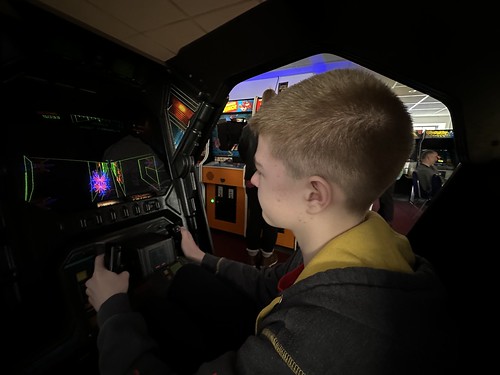
Photo of a younger teenager in a yellow and grey hood sat in an Atari Star Wars pod. The screen is on the left and shows a wireframe of the attack on the Death Star Trench.
Atari Star Wars

I took the last Friday of the school holiday off, and took the youngster out for a trip to Arcade Club in Leeds. It’s a bit of a run for us (the opposite side of the city) but it turned out to be a fun afternoon. Arcade Club has three floors packed with a huge number of arcade consoles from the 1970s onwards. The ground floor has machines from the 1990s onwards, including rhythm games, pin ball and the classics like Daytona and Sega Rally. The mezzanine floor is filled with all the classic coin-ops I remember from the 1980s, and the top floor has fighting games, VR, consoles, and more Japanese style sit at consoles.

You play a flat entrance fee, and all the games are on free vend. We were hit with a wave of sound as we came in; the ground floor is a storm of noise. The staff were friendly, and we also had a break at the cafe, which wasn’t overpriced at all. There is a reasonable bar selection, probably aimed at catering for the crowd after the post 6pm ‘no kids’ cut off.

We tried a couple of games on the ground floor; Ridge Racer, Sega Rally and a flying game called Afterburner, but quickly went upstairs. The youngster wanted to try some of the classics. Immediately after we got upstairs he was in the Atari Star Wars pod. This was the classic wire-frame Death Star attack (which he’d played as a kid on my old iPad). He loved it.

We then went around and played loads of machines. 

  • Space Invaders (where I got asked why they were getting faster!)
  • Galaxian (we played this one a fair bit)
  • Galaga
  • Frogger (he thrashed me at this)
  • Pac Man (I thrashed him at this)
  • Moon Patrol (he loved this)
  • Centipede (he loved this)
  • Millipede
  • Battlezone (I found the excitement I had over this has been eclipsed by World of Tanks)
  • Missile Command (he got good at this quickly but we all died)
  • Paperboy (he loved this)
  • Asteroids (this was one he struggled with)
  • Robotron
  • Defender (he wouldn’t touch this - said it looked too complex)
  • Star Gate (same as Defender, which it’s an evolution of)
  • Tempest (my favourite but he wouldn’t play it as he didn’t like the look of the controller)
  • Scramble (looked very much like the BBC Model B version in a cabinet)
  • Return of the Jedi (looked very much like a game I vaguely remember on the ZX Spectrum with Speeder Bikes)
  • Hot Rod (an up-to four person game where he thrashed me)
I’m sure that I missed some out. The youngster made a joke that I loved the Atari corner, but I also seemed to like games with odd controllers (track balls, rotary or spinning action). Tempest was the highlight of my visit; I’ve never played it for real in an arcade, but absolutely loved Tempest 2000 on the Atari Jaguar.

We spent nearly four hours there, so it was a good afternoon out. It’s work noting the car parking is only 90 minutes, but you can park for free for an unlimited time at the Morrisons/Retail Park opposite. 

Definitely recommended. There are other sites (eg Bury) that friends have also said good things about.

13 April 2024

13 January 2024

[reMarkable 2] 3 Years On…

A reMarkable 2 tablet held in a grey polymer folio case with the reMarkable logo on the bottom right in white.
Well used reMarkable 2

I’ve been using my reMarkable 2 since November 2020 (Batch 5 preorder).  It’s worked solidly since then, used multiple times daily at work and for home activities. I know at least five people who’ve bought one having tried mine (plus one who got a Kindle Scribe and another who got a Boox). I bought my eldest a second hand rM1 for college which he loves (I do like the robustness of that version). 


I keep it in the tablet sleeve you can see behind it when I’m not using it. I finished the first lot of nibs about 3 months ago. I have the marker plus and it’s still working fine. I did clean the folio last year following advice from here. The edges are a little frayed and you can see the use, but it looks smart still. 


The battery life is good (but I mainly work in airport mode). 


I’ve tried the Lamy, the Norris Jumbo and the HP pens and each of them are great for the right mood but I keep coming back to the marker plus. 


I love using it outside in the summer; sometimes I’ll step away from the teams calls and just use the phone. 


It’s been updated at least 20 times as the software has got much better (the only bit I’m not so hot on is the way OCR works now). I’ve never gone beta as this is a work tool for me. 


I scanned my old Leuchterm and Moleskine notebooks to PDF and added them in as a reference. 


It just works. 


I do treat it like a £500 device (which it was with the accessories) and look after it. I’d replace it in an instant if it broke. 


I’m posting this because all too often all we see are the stories when something has gone wrong. After three years, this still delights me everyday.

30 September 2023

First Impressions - Playdate, a retro-handheld by Panic

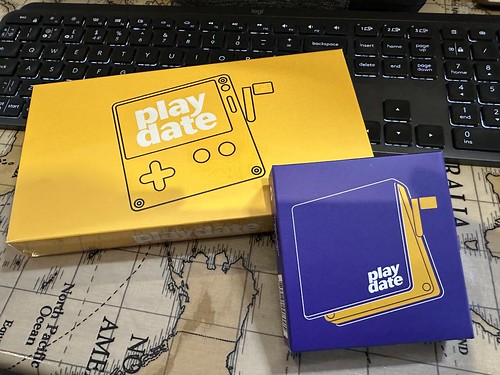
Picture of a yellow rectangular box with a picture of a Playdate handheld and a smaller purple square box showing a Playdate cover, both resting on a table with a world map on it, and inclined on a black keyboard at the top of the picture.
The Playdate packaging is cute.

Back in March 2023, I impulsively ordered a Playdate handheld. I’d been intrigued when they first came out, but resisted. However, I’d seen a few reviews, and as I’ve been travelling more, it seemed like a cute option to do some casual gaming when I was away. Plus, Panic had announced there was a price increase coming so it seemed like a good time to lock in a device at the launch price. 
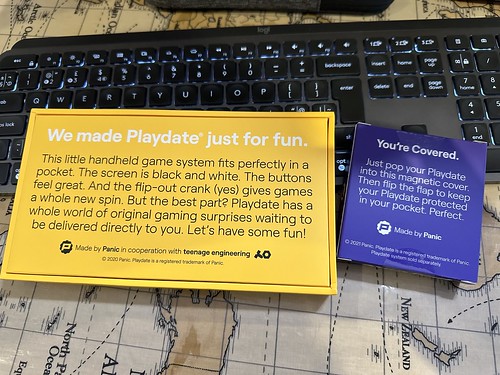

Same set up as the first picture, but showing the back of the boxes
The back of the boxes

The Playdate is Panic’s first foray into hardware; usually they produce software, mainly for macOS (but they have also published for Windows and XBox with games like Firewatch and Untitled Goose Game). The little yellow handheld they’ve produced is pretty open; they encourage side loading of games and there’s an active Itch.io community. Most of the games are pretty cheap; an expensive one would be around the $12 range, but many are Pay-what-you-want or in the $2 to $4 range.


The Playdate box opened, showing the little yellow handheld in foam at a jaunty angle, alongside a similarly jauntil placed black cardboard sleeved yellow USB cable with the words “Have Fun” written on the sleeve
Unboxed…

The device is really cute looking and very small. It has a highly reflective black and white LCD screen, a D-Pad and two buttons (A and B) for gaming, plus a button at the top right to access menus, and another button on the top right to power on and off. And then there’s the crank, an analogue controller which is used in some games and also in some system functions like buying and opening games. It charges and connects over USB-C and a 3.5mm headphone stereo jack at the bottom. The device’s speakers are mono and sound decent enough. There’s also a microphone, but I’ve not seen anything use that yet. The Playdate connects to WiFi and you can download games and updates from Panic.
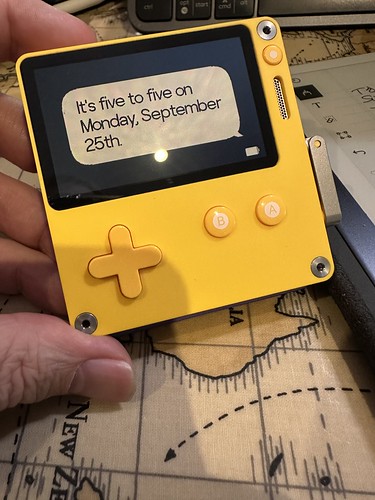
Playdate held in my hand, showing the clock in sleep mode. The clock is set to “words” mode, rather than digital or analogue. It says “It’s five to five on Monday September 25”
Tiny handheld, interesting clock options 

There are three routes to getting games; the device comes some (‘Season One’) arriving with two, and then having more two more games drop for free each week. In total there are 24 games, with a wide variety of options. The second route is to install the Catalog app, and you can buy from a curated collection of games hosted by Panic. Finally, you can buy games from other sources like Itch.io or even code them yourself and sideload them over WiFi or over USB. 
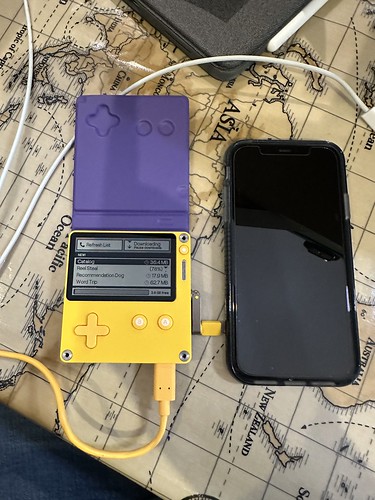

Playdate handheld, purple cover open, showing the Catalog app loading games. It’s connected to USB to charge with an iPhone 11 to the right of it to provide scale.
Playdate charging while downloading games on the Catalog app, with iPhone 11 for scale.

I’m very much a casual gamer (mostly). Playing through the whole of Firewatch in two evenings is probably the most extended play that I’ve done recently, although I do have a World of Tanks Blitz habit. Most of the games I’ve downloaded are very much bite-size games; they’re your classic arcade games. It actually reminds me of the ZX81 and ZX Spectrum days; I do hope someone comes up with a decent take on 3D Monster Maze soon! I’ve sideloaded a lot of the classics like Frogger, Invaders and Pac Man. There are some great puzzle games; these range from more Sudoku / Minesweeper like games, through to arcade puzzlers where you push and pull things to solve a level. There are adventure games, although I haven’t really explored these properly yet. 

Most games are the kind of entertainment you can play for a bite-sized bit of fun, but it’s also easy to lose an hour.

The screen can be challenging in artificial light; there’s no backlight so you have to angle it right to get the best view. I’ve not really found that an issue, but I have seen people moan about it on the internet.

My favourite games at the moment are SlitherlinkPD (a minesweeper/sudoku style puzzler using the crank to wind back time), Gravity Express (Lunar landings, using the crank to orientate the ship), Grand Tour Legends (crank-driven cycling), Gatecrasher (pilot a ship through a series of gates, kind of Tempest style, using the crank) and Four Corners (kind of Tetris like block clearing game).

I’ve no regrets picking this up, even the wait built some anticipation. (Panic batch manufacture Playdate, so you effectively pre-order; mine took six months to arrive).

The yellow Playdate handheld, sandwiched in its purple cover, held in a hand with a decorative window behind
The Playdate in its cover - reminds me of an ice-cream sandwich.

I’ll leave you with a cute picture of the Playdate in its cover above. I look at it and it makes me smile. Teeny. Cute. Fun.

30 September 2023

29 January 2023

The Bird Site Massacre

Victims of the Bird Site Massacre

So, as I feared, the worst was confirmed; Twitter deliberately killed off the third party clients without notice, despite their helping drive the service's development and often being used by the more active users. Twitterrific and Tweetbot and more gone without warning to company or users. Twitter's developer terms and conditions retroactively changed to make such services unacceptable. 

Confirmation of death - Twitterrific
Confirmation of Ollie's demise

This made the decision to leave the bird site quite easy for me; I exported archives of my data (which come as a funky HTML set up so you can explore them and closed down both my accounts. They'll auto delete in less than a month. The BITS Traveller account is still there but we're discussing what to do with that (and, to be honest, it's mostly been dormant since the pandemic hit). So if you want to find me on social media, you can hook up with me on Mastodon, where I'm on the Dice Camp server using my usual Cybergoths tag (something from university, don't ask!).

It was a strange feeling killing the accounts. I opened the private one on Friday 3 April 2009 at 7:24 in the morning and closed it at 21:40 on 22 January 2023. The public account was started later - Sunday 5 June 2011 at 10:14 - and closed last at 12:19 on 26 Jan 2023. They've been there a while, but increasingly had less value and engagement as the algorithms that drive toward contention made Tweeting more and more like shouting into the void. Twitterrific combated that, but the reduced API access that the application got over time didn't help the bird site be more approachable. Functionally, Twitter has been dying for me for quite some time, so I guess I should thank Space Karen for pushing me over the line to decide to leave. To be honest, using the official Twitter app and website made it clear it wasn't for me anymore.

Failing Twitter Engagement

The failure of Twitter on engagement was shown by a Mastodon toot by Ged Maheux, one of the Iconfactory team. They've 16.1k followers on Twitter and 4.1k on Mastodon. They tweeted the same material on both sites and got 9 likes and 3 retweets on Twitter and 287 favourites and 163 boots on Mastodon. Others are reporting the same.

I like what I see on Mastodon, especially now Tapbots have released Ivory, a Mastodon app for iOS which uses their experience on Tweetbot to create an excellent application which is actively being developed. The basic Mastodon app was fine, but Ivory jumps it to another level. Mastodon reminds me of early Twitter crossed with Google+, which is a good thing. I do get a bit annoyed with some of the others who have fled from Twitter or are hedging their bets on both sites who keep on using Twitter conventions and posting Tweets. I don't want Mastodon to just be another Twitter, I want it to be it's own thing.

Project Phoenix - Twitterrific
Project Phoenix About dialog box.

I do hope that The Iconfactory re-enter the space using their experience from Twitterrific but Tapbots are also doing a great job and winning me over. I had a connection to Twitterrific because it was how I discovered Twitter, and I'd also backed the Kickstarter to update the macOS version of the app to match the iOS one.

Thank you to The Iconfactory for 14 years of excellence, and thank you to Tapbots for making the jump to Mastodon and bringing a great experience.

Let's see where the herd takes us. 

29 January 2023

15 January 2023

Farewell Twitterrific?


Ollie is sad…

About 48 hours ago, the primary way that I access Twitter shutdown. The venerable but still sprightly Twitterrific iOS app lost its API connections that allow it to talk to Twitter. It appears to be a deliberate move from the social media site, but there have been no announcements or communication to the developers. Previously, when the API got changed to limit some functionality to Twitter’s own applications, the developers were briefed in advance. This time, nothing. The only reason it’s thought that it’s a deliberate choice is that there have been leaks from Twitters internal comms. The changes affect the most popular third party connections; Tweetbot as also down. Ironically, at the moment, the macOS version of Twitterrific still works.

It’s suspected that if deliberate, the disconnection happened because the apps allow you to see a linear timeline without promoted posts and advertising driven by the algorithm that now drives the feed that Twitter gives you. Of course, that was the attraction of these apps. Ironically, the previous changes to Twitter’s APIs meant I have their app installed too because it’s the only way to get notifications. This means I get to use their UI pretty regularly, get shown the adverts etc so the reality is that the company isn’t really loosing out.

I’ve loved using Twitterrific; it was an app I got into when I first got into Twitter and had recently become a dad. We used to have Saturday Morning Dad’s club chats on it and more. It has a lovely interface and I will miss it. I’d started to move away from Twitter to Mastodon anyway (which feels like a lovely blend between Google+ and Twitter) and this will only accelerate that move. Once the macOS app goes, so am I (but I’ve left a trail of breadcrumbs in my usernames on Twitter).

As well as its great UI, Twitterrific actually invented the term tweets and created a bird logo which inspired Twitter’s own. It’s an app intimately tied to the history of the service, and it seems almost apt that as the new owner of Twitter burns it down, Twitterrific disappears into memory lane, much loved and missed.

I do hope that the Iconfactory produce an Olliphant app for Mastodon.

Farewell, and thank you.

15 January 2023

Edit: it was deliberate. They killed the entire third party client ecosystem.

02 January 2023

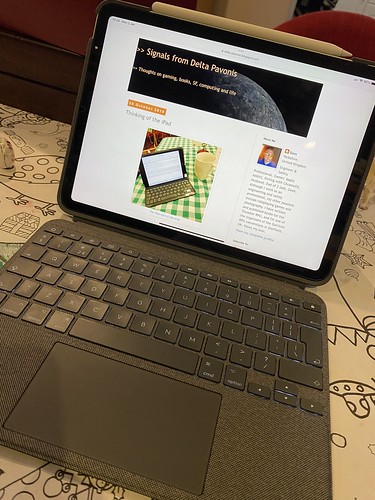
Thinking of the iPad redux

iPad redux

Back in 2019, I mused about whether the iPad was a viable replacement for my Mac. Back then I concluded it wasn’t, but it would do 80% of what I needed day-to-day. Four years on, what’s the state of play?

When I asked that, I was using the iPad mini 4, a 7” device, along with a Logitech keyboard. I’m now using a 10” iPad Air 4 with a Logitech Keyboard with an integrated trackpad. I also have an Apple Pencil 2. So this comparison is with a faster device with a bigger screen and a selection on non-touch pointing devices. iPadOS has moved on significantly since I last looked, and it’s fair to say that there has been a degree of alignment between macOS and iPadOS so the look and feel isn’t that different overall.

I’m already using the iPad for work - with authentication and the Microsoft iPad compatible apps (Office, Outlook, Teams), it’s a very viable work device. Yes, it’s still a bit behind the experience and flexibility of the Mac or the Windows PC, but the gap is significantly closer. I could certainly travel with this and not miss the laptop.

I’ve also got access to apps like Scrivener which are cross platform and perfect for writing long-form for non-work activities.

The Affinity suite is impressive; these are desktop grade apps. I don’t think I’d consider doing something major with them, but I could. I’ve already retouched a few photos and experimented with Designer. Publisher will be interesting when I have a project going (which I hope to soon). My main hesitancy in using them for something major is that my MacBook is a lot faster (MacBook Pro with an M1 Pro versus an A14 chip), and has a bigger screen. It’s better built for heavy lifting. But I could do a book’s layout on the iPad now, which is a world of difference to 2019.

The Pencil is useful for precision work, and the handwriting recognition is very good. The touchpad is brilliantly done; it moves like you’d expect, but whenever it crosses a touch target, it highlights subtly. 

The Files app now feels like a desktop experience for accessing files; sometimes a bit clunky, but very much a decent interface and experience.

All the barriers have gone. 

So to my question, could I replace my Mac with an iPad? The answer is now a conditional ‘yes’. There would be some compromises, but the state of the art has moved. I think the iPad can easily do 90% of what a Mac can. However, there are some power apps and flexibility it can’t do. I suspect that the convergence will continue over time (especially as the M-series Macs can run iPad apps). 

2 January 2023